
TL;DR:
Use the Group field to control which Form 8949 section a transaction is assigned to. If no valid value is set, a default section is used automatically.
What is this feature used for?
This feature allows you to assign transactions to specific sections of Form 8949 using the Group field.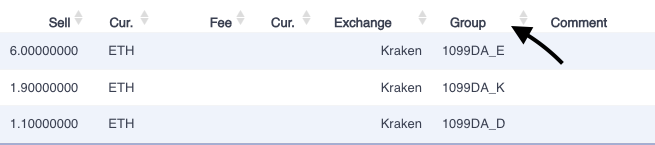
It is relevant if:
your broker issued a Form 1099-DA
you need to match transactions to the correct reporting box
What are the requirements?
Available for tax reports from 2025 onwards only
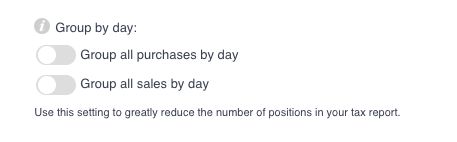
The option “Group by day” must be disabled
How does it work?
CoinTracking reads the Group field of each transaction:
If a valid 1099DA_x value is detected → the transaction is assigned to the corresponding Form 8949 section
If empty or invalid → a default section is used
Which Group values are valid for short-term transactions?
1099DA_A → Section A
1099DA_B → Section B
1099DA_C → Section C
1099DA_G → Section G
1099DA_H → Section H
1099DA_I → Section I (default if empty or invalid)
Example: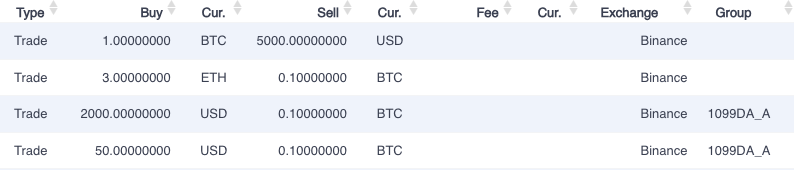
8949 Form: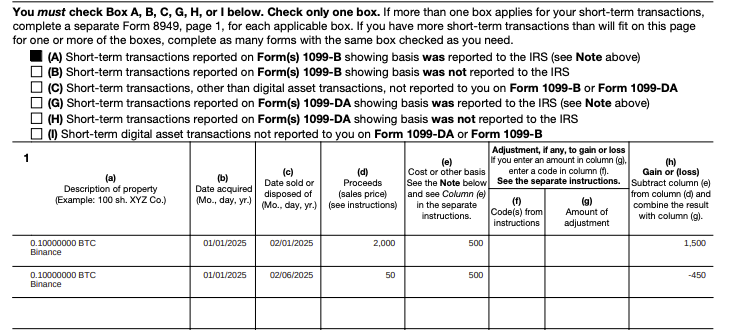
Which Group values are valid for long-term transactions?
1099DA_D → Section D
1099DA_E → Section E
1099DA_F → Section F
1099DA_J → Section J
1099DA_K → Section K
1099DA_L → Section L (default if empty or invalid)
8949 Form:
Example: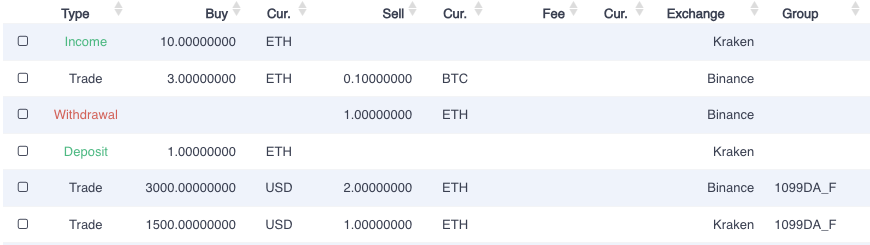
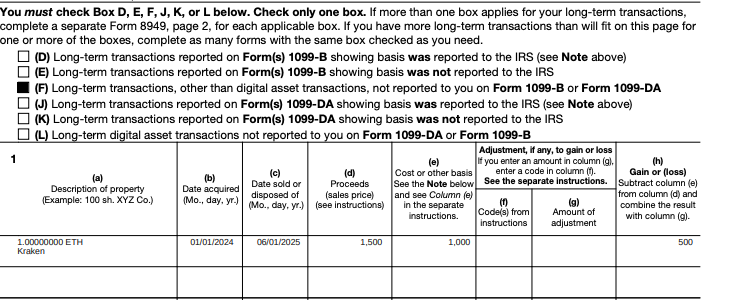
NOTE: You might notice that we added 2 transactions to Trade Group 1099DA_F. Since one of the transactions originates from short-term holdings, it is invalid for this group. Therefore, we assign it to the short-term default Letter I in Section I.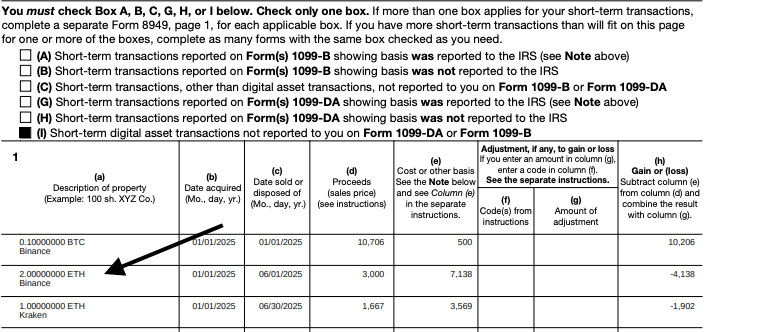
In which order are sections shown in Form 8949?
Short-term: A → B → C → G → H → I
Long-term: D → E → F → J → K → L
How are totals calculated (short-term)?
Totals are calculated from columns (d), (e), (g), and (h), subtracting negative values.
They are transferred to Schedule D as follows:
Line 1b → Box A or G
Line 2 → Box B or H
Line 3 → Box C or I
How are totals calculated (long-term)?
The same calculation logic applies.
Transfer to Schedule D:
Line 8b → Box D or J
Line 9 → Box E or K
Line 10 → Box F or L
What happens if the Group field is empty?
If the Group field is empty or contains an invalid value:
Short-term → Section I
Long-term → Section L
Summary
The Group field determines the Form 8949 section for each transaction. Valid 1099DA_x values allow precise assignment, while empty or invalid entries default to Section I (short-term) or Section L (long-term).